 Click Allow to get more information on apkbbs Services for free!




Google Earth
 4.2
4.2
About This APP


 Download Latest Version
Screenshots


Editor Reviews
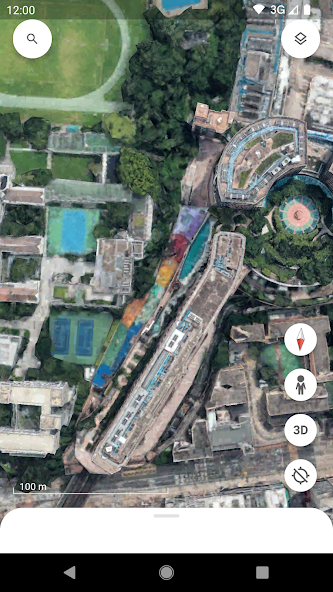
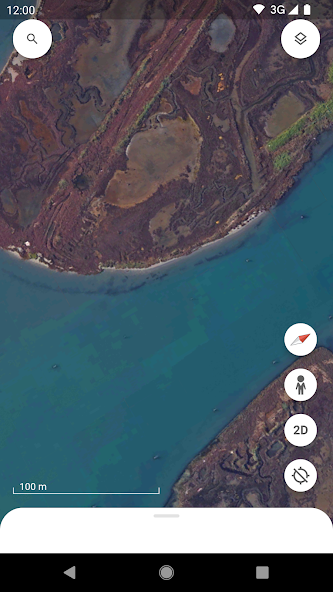
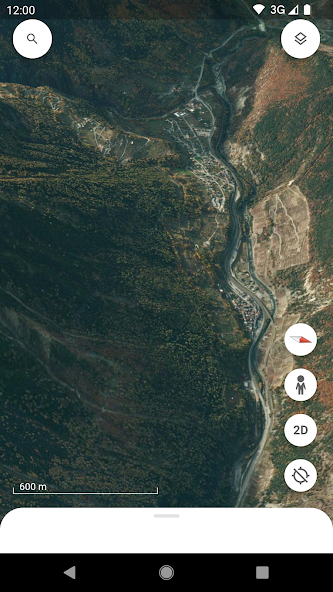
Google Earth, created and offered by Google LLC, is a highly advanced geospatial software that enables individuals to view the world from a virtual reality. Using high-resolution satellite imagery, aerial photos, and street-level pictures, the software provides a realistic geographic experience. It is not just a device for recreational exploration, but Google Earth is used professionally in urban development, environmental studies, teaching, and real estate. The software is widely used for its GIS data integration capability, rendering it highly beneficial to professionals who require accurate spatial visualization and analysis. Using this software, users can move through different landscapes without any hassle, zoom in on landmarks, and even move through the landscapes of the Moon and Mars, stretching their vision beyond planet Earth.
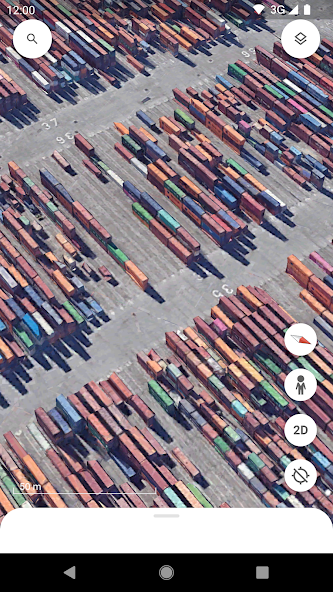
The actual user interface with Google Earth is very interactive and intuitive. On launch of the application, the user is shown a dynamic 3D Earth view that can be tilted to change the angles and zoom levels. The resolution of satellite imagery is impressive with a crisp, clear view of the world regions. Cities and natural terrain come alive through detailed 3D buildings, contours, and geographic features. For instance, the street view mode enables users to “walk into” cities and walk down city streets virtually, providing a complete feel of being at that place. The facility to toggle between older imagery provides a great opportunity for visual analysis of geographical and urban development over time. The facility is particularly useful for urban planners and historians to analyze changes in land use. Users could face challenges when working with certain areas because latest imagery might not be accessible.
This mapping application features an interface which remains straightforward enough for anyone irrespective of their technical understanding. Features such as the option to create one’s own maps and exporting of routes are particularly convenient. The users can create maps of interested areas, calculate distances, and perform elevation analysis using these capabilities. For users of GIS and researchers, the capacity to add external data types like ESRI shapefiles and KML files significantly broadens the applicability of the software. Through its interactive interface the software includes a GPS data import function that supports both planning and tracking operations. The software provides users who are not experts with a learning and interesting experience that involves both aerial exploration of the planet and close inspection of famous locations and architectural wonders. Nevertheless, the app can become slow or crash occasionally, particularly when working with large datasets or on older computers.
Features
 High-resolution satellite imagery, which provides the user with sharp and lively photos of the whole world.
Capability to overlay GIS data with support for a good number of standard file types such as KML, KMZ, and GeoTIFF.
Historical imagery capability that enables the study of geographical as well as urban changes over periods.
Precise measurement tools which facilitate the calculation of distances or areas, as needful for analysis and planning.
3D terrain and city visualizations for enhanced realistic exploration features.
Interactive software to draw placemarks, hand-create personal paths, and plot polygons directly on maps for specific uses.
Integrated street view to virtually explore towns and countryside using ground-level views.
Multi-platform functionality with desktop and mobile apps to offer access from any device.
High-resolution satellite imagery, which provides the user with sharp and lively photos of the whole world.
Capability to overlay GIS data with support for a good number of standard file types such as KML, KMZ, and GeoTIFF.
Historical imagery capability that enables the study of geographical as well as urban changes over periods.
Precise measurement tools which facilitate the calculation of distances or areas, as needful for analysis and planning.
3D terrain and city visualizations for enhanced realistic exploration features.
Interactive software to draw placemarks, hand-create personal paths, and plot polygons directly on maps for specific uses.
Integrated street view to virtually explore towns and countryside using ground-level views.
Multi-platform functionality with desktop and mobile apps to offer access from any device.
Advantage
 Completely available to use with many features that would otherwise be paid in professional GIS software.
Extremely user-friendly with both beginner- and GIS expert-friendly interfaces.
High-resolution and precision in satellite imagery, providing users with a realistic sense of space.
Map creation that can be tailored to seamlessly incorporate both user-supplied and external datasets.
Historical imagery gives valuable insights to environmental and urban studies.
Can incorporate other GIS tools, such as ArcGIS and QGIS, to simplify analysts’ work.
Completely available to use with many features that would otherwise be paid in professional GIS software.
Extremely user-friendly with both beginner- and GIS expert-friendly interfaces.
High-resolution and precision in satellite imagery, providing users with a realistic sense of space.
Map creation that can be tailored to seamlessly incorporate both user-supplied and external datasets.
Historical imagery gives valuable insights to environmental and urban studies.
Can incorporate other GIS tools, such as ArcGIS and QGIS, to simplify analysts’ work.
Shortcoming
 Some of the features such as up-to-date satellite imagery require additional payments or are poorly maintained in certain regions
Periodic slowness, freezes, or even crashes when using large datasets.
The inability to fully remove current buildings and environments when projecting potential developments.
Some points on the map with blurred or low-resolution images, which lowers the quality of visual analysis.
Some of the features such as up-to-date satellite imagery require additional payments or are poorly maintained in certain regions
Periodic slowness, freezes, or even crashes when using large datasets.
The inability to fully remove current buildings and environments when projecting potential developments.
Some points on the map with blurred or low-resolution images, which lowers the quality of visual analysis.
 Scanned by
Virus Total
Scanned by
Virus Total
Ratings
-
5

-
4
-
3
-
2
-
1
Disclaimer
 APKBBS does not directly participate in application distribution and does not hold shares of
application developers directly.
We provide images and links included in Google Play and App Store to help our users find the best
applications and games. All merchant trademarks and logos displayed on the website are the property of
their respective owners. The website is not affiliated with or associated with any of them.
APKBBS complies with the Federal Digital Millennium Copyright Act (DMCA) by responding to suspected
infringement notices that comply with DMCA and other applicable laws.
Every APK file that may be downloaded from APKBBS.com is also secure.
APKBBS does not directly participate in application distribution and does not hold shares of
application developers directly.
We provide images and links included in Google Play and App Store to help our users find the best
applications and games. All merchant trademarks and logos displayed on the website are the property of
their respective owners. The website is not affiliated with or associated with any of them.
APKBBS complies with the Federal Digital Millennium Copyright Act (DMCA) by responding to suspected
infringement notices that comply with DMCA and other applicable laws.
Every APK file that may be downloaded from APKBBS.com is also secure.
Hot Apps
 4.4
4.4
 4.3
4.3
 4.2
4.2
 4.5
4.5
 4.3
4.3
 4.5
4.5
 4
4
 4.8
4.8
 4.5
4.5
 4.5
4.5
 4.1
4.1
 4.3
4.3

Amazon Alexa
Duolingo: language lessons

Geeni
Nextdoor: Neighborhood network

Police Scanner - Scanner Radio

Shazam

SiriusXM: Music, Sports & News
TextNow: Call + Text Unlimited

Yuka - Scan de produits
WhatsApp Messenger

Google Chat

OfferUp: Buy. Sell. Letgo.

Fitbit
Tubi TV

Afterpay - Buy Now. Pay Later

Wyze - Make Your Home Smarter

SHEIN-Shopping Online
Signal

MyChart