 Click Allow to get more information on apkbbs Services for free!




CapCut
 4.5
4.5
About This APP


 Download Latest Version
Screenshots




Editor Reviews
CapCut, developed by ByteDance Pte. Ltd., has quickly become a prominent player in the video editing landscape, especially for mobile users. Launched initially for iOS and Android, CapCut has expanded its reach with web-based and desktop versions, making it accessible across various platforms.
Primarily, CapCut stands out for its user-friendly interface and a robust suite of editing tools that cater to both beginners and more experienced users. The app’s seamless integration with TikTok, also owned by ByteDance, has significantly contributed to its popularity among short-form video creators. Users can easily create, edit, and share videos directly to TikTok, making the process of content creation and distribution incredibly efficient.
Additionally, one of another CapCut’s most appealing aspects is its accessibility. The app is costless to install and use, with a wide array of features available without any cost. This includes basic editing tools like trimming, cropping, and adding text, as well as more advanced features such as keyframe animations, chroma keying, and 3D zoom effects. For those seeking even more capabilities, CapCut offers a Pro version that unlocks additional features and provides 100GB of online storage.
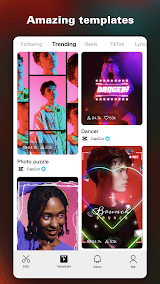
CapCut’s interface is designed to be intuitive, with a clean layout that makes navigation straightforward. Users can start a new project with ease, thanks to the clear icons and labels on the home screen. The app also offers a variety of templates, which can be a great starting point for those new to video editing or looking for quick solutions. These templates are professionally designed and cover a range of styles and themes, making it easy to create polished videos in minutes.
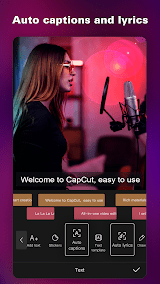
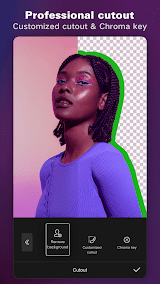
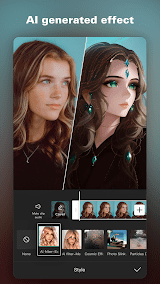
As a matter of fact, what sets CapCut apart from its peers is its Auto Captions tool, which automatically generates subtitles from voice-overs. This can be particularly useful for content creators looking to make their videos more accessible. Additionally, the app’s body effects, such as emoji faces that track movements, and its chroma key feature for background removal, provide creative options that are typically found in more advanced editing software.
Despite its many strengths, CapCut is not without its limitations. The app’s mobile-focused design means that it may not offer the same level of control and precision as desktop-based professional editing software. For instance, CapCut supports only single audio and video tracks, which can be a constraint for more complex projects. Additionally, while the app is mostly costless, some advanced features are locked behind a subscription, which might not be ideal for all users.
CapCut is a powerful and versatile video editing app that offers a wide range of features for costless, making it an excellent choice for both beginners and more experienced users. Its seamless integration with TikTok and user-friendly interface make it particularly appealing for short-form video creators. However, its mobile-focused design and limited track support may pose challenges for professional editors. Despite these limitations, CapCut remains a top contender in the video editing app market, providing robust tools and creative options that can help users produce high-quality videos with ease.
Features
 Automatically generates subtitles from voice-overs, enhancing accessibility and saving time for creators.
Allows users to add dynamic effects like emoji faces that track movements, adding a fun and creative element to videos.
Enables background removal for green screen effects, providing professional-level editing capabilities.
Offers precise control over animations and allows text or stickers to follow objects on screen.
Transforms images into 3D dioramas, adding depth and a unique visual effect to videos.
Automatically generates subtitles from voice-overs, enhancing accessibility and saving time for creators.
Allows users to add dynamic effects like emoji faces that track movements, adding a fun and creative element to videos.
Enables background removal for green screen effects, providing professional-level editing capabilities.
Offers precise control over animations and allows text or stickers to follow objects on screen.
Transforms images into 3D dioramas, adding depth and a unique visual effect to videos.
Advantage
 Most of CapCut’s features are available for costless, making it accessible to a wide range of users.
The intuitive design ensures that even beginners can navigate and use the app effectively.
Offers advanced editing tools like chroma keying and keyframe animations, which are typically found in professional software.
Directly linked to TikTok, allowing for easy sharing and increased visibility for content creators.
Available on mobile, web, and desktop, providing flexibility in how and where users edit their videos.
Most of CapCut’s features are available for costless, making it accessible to a wide range of users.
The intuitive design ensures that even beginners can navigate and use the app effectively.
Offers advanced editing tools like chroma keying and keyframe animations, which are typically found in professional software.
Directly linked to TikTok, allowing for easy sharing and increased visibility for content creators.
Available on mobile, web, and desktop, providing flexibility in how and where users edit their videos.
Shortcoming
 The app’s design is optimized for mobile use, which may limit its functionality for professional editors.
Supports only single audio and video tracks, which can be restrictive for complex projects.
Some advanced features are locked behind a subscription, which may not be ideal for all users.
The app’s design is optimized for mobile use, which may limit its functionality for professional editors.
Supports only single audio and video tracks, which can be restrictive for complex projects.
Some advanced features are locked behind a subscription, which may not be ideal for all users.
 Scanned by
Virus Total
Scanned by
Virus Total
Ratings
-
5

-
4
-
3
-
2
-
1
Disclaimer
 APKBBS does not directly participate in application distribution and does not hold shares of
application developers directly.
We provide images and links included in Google Play and App Store to help our users find the best
applications and games. All merchant trademarks and logos displayed on the website are the property of
their respective owners. The website is not affiliated with or associated with any of them.
APKBBS complies with the Federal Digital Millennium Copyright Act (DMCA) by responding to suspected
infringement notices that comply with DMCA and other applicable laws.
Every APK file that may be downloaded from APKBBS.com is also secure.
APKBBS does not directly participate in application distribution and does not hold shares of
application developers directly.
We provide images and links included in Google Play and App Store to help our users find the best
applications and games. All merchant trademarks and logos displayed on the website are the property of
their respective owners. The website is not affiliated with or associated with any of them.
APKBBS complies with the Federal Digital Millennium Copyright Act (DMCA) by responding to suspected
infringement notices that comply with DMCA and other applicable laws.
Every APK file that may be downloaded from APKBBS.com is also secure.
Hot Apps
 4.4
4.4
 4.3
4.3
 4.2
4.2
 4.5
4.5
 4.3
4.3
 4.5
4.5
 4
4
 4.8
4.8
 4.5
4.5
 4.5
4.5
 4.1
4.1
 4.3
4.3

Amazon Alexa
Duolingo: language lessons

Geeni
Nextdoor: Neighborhood network

Police Scanner - Scanner Radio

Shazam

SiriusXM: Music, Sports & News
TextNow: Call + Text Unlimited

Yuka - Scan de produits
WhatsApp Messenger

Google Chat

OfferUp: Buy. Sell. Letgo.

Fitbit
Tubi TV

Afterpay - Buy Now. Pay Later

Wyze - Make Your Home Smarter

SHEIN-Shopping Online
Signal

MyChart