 Click Allow to get more information on apkbbs Services for free!



Link to Windows
 4
4
About This APP


 Download Latest Version
Screenshots


Editor Reviews
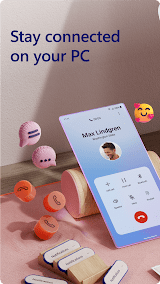
With the development of science and technology, mobile phones and computers have become indispensable tools in our daily life and work. However, there are many inconveniences in information exchange and file transfer between the two. In order to solve this problem, Microsoft launched the software named Link to Windows , which is designed to seamlessly connect users' mobile phones with Windows computers through wireless connection, to achieve instant information sharing and convenient file transfer.
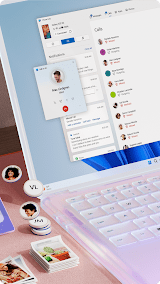
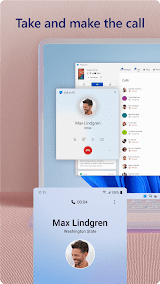
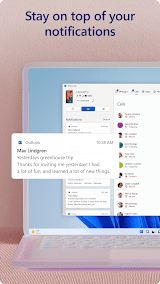
The biggest feature of Link to Windows is its powerful connection function and convenient operation experience. First, through a wireless connection such as Wi-Fi or Bluetooth, Link to Windows can easily connect a user's phone to a Windows PC without the need for a data cable or third-party software. Secondly, once the connection is successful, the user can directly access the photos, SMS, notifications and other files on the phone on the computer, realizing the instant sharing of information. In addition, Link to Windows also supports cross-device operation, users can answer or make calls on the computer, send and receive text messages, greatly improving work efficiency.
In summary, Link to Windows, as a bridge software connecting mobile phones and computers, performs well in connection stability, information synchronization and cross-device operation. Although it has limited support for non-Windows systems and relies on network connection, its simple and clear interface design and powerful features still win the love of the majority of users. For users who need to frequently transfer files and information between their phones and computers, Link to Windows is definitely a worthwhile option.
Features
 Connection stability: Link to Windows has excellent connection stability. During the test, whether it is a Wi-Fi connection or a Bluetooth connection, the connection can be quickly and stably established, and there is no disconnection or deadlock during the entire use process.
Information synchronization: Link to Windows does an excellent job of information synchronization. Whether it is photos, text messages or notifications on the mobile phone, it can be synchronized to the computer in real time, so that users can grasp the latest news of the mobile phone anytime and anywhere. At the same time, users can also operate and manage these files directly on the computer, convenient and fast.
Cross-device operation: Link to Windows cross-device operation is very powerful. Users can make and receive calls and send and receive text messages from their computers without having to switch devices frequently. This seamless connection greatly improves productivity and allows users to focus more on the work itself.
Interface design: Link to Windows’s interface design is simple and clear, easy to use. Users only need to realize the connection and information synchronization between mobile phones and computers through simple operations. At the same time, the software also supports custom Settings, users can adjust according to their own needs.
Connection stability: Link to Windows has excellent connection stability. During the test, whether it is a Wi-Fi connection or a Bluetooth connection, the connection can be quickly and stably established, and there is no disconnection or deadlock during the entire use process.
Information synchronization: Link to Windows does an excellent job of information synchronization. Whether it is photos, text messages or notifications on the mobile phone, it can be synchronized to the computer in real time, so that users can grasp the latest news of the mobile phone anytime and anywhere. At the same time, users can also operate and manage these files directly on the computer, convenient and fast.
Cross-device operation: Link to Windows cross-device operation is very powerful. Users can make and receive calls and send and receive text messages from their computers without having to switch devices frequently. This seamless connection greatly improves productivity and allows users to focus more on the work itself.
Interface design: Link to Windows’s interface design is simple and clear, easy to use. Users only need to realize the connection and information synchronization between mobile phones and computers through simple operations. At the same time, the software also supports custom Settings, users can adjust according to their own needs.
Advantage
 Wide compatibility: Link to Windows not only supports Windows 10, but is also compatible with Windows 11 and newer Windows versions, and is compatible with a variety of Android phone brands, providing users with a wide range of options.
Rich integration: In addition to basic photo, SMS and notification syncing, Link to Windows offers more advanced features. For example, users can open applications in the phone directly on the computer, drag and drop files, and use clipboard and other functions, which greatly improve the user's work efficiency.
Efficient file transfer: Link to Windows achieves efficient file transfer between mobile phones and computers through a wireless connection. Users can easily transfer files from their phone to their computer or send files from their computer to their phone without using a data cable or third-party software, which greatly saves users time and effort.
Continuous updates and optimizations: Microsoft continuously updates and optimizes Link to Windows to meet the growing needs of users. With the introduction of new features and improved performance, Link to Windows will bring users a better experience.
Wide compatibility: Link to Windows not only supports Windows 10, but is also compatible with Windows 11 and newer Windows versions, and is compatible with a variety of Android phone brands, providing users with a wide range of options.
Rich integration: In addition to basic photo, SMS and notification syncing, Link to Windows offers more advanced features. For example, users can open applications in the phone directly on the computer, drag and drop files, and use clipboard and other functions, which greatly improve the user's work efficiency.
Efficient file transfer: Link to Windows achieves efficient file transfer between mobile phones and computers through a wireless connection. Users can easily transfer files from their phone to their computer or send files from their computer to their phone without using a data cable or third-party software, which greatly saves users time and effort.
Continuous updates and optimizations: Microsoft continuously updates and optimizes Link to Windows to meet the growing needs of users. With the introduction of new features and improved performance, Link to Windows will bring users a better experience.
Shortcoming
 Limited support for non-Windows systems: Currently Link to Windows mainly supports Windows systems, with limited support for other operating systems, which may limit the use of some users.
 Scanned by
Virus Total
Scanned by
Virus Total
Ratings
-
5

-
4
-
3
-
2
-
1
Disclaimer
 APKBBS does not directly participate in application distribution and does not hold shares of
application developers directly.
We provide images and links included in Google Play and App Store to help our users find the best
applications and games. All merchant trademarks and logos displayed on the website are the property of
their respective owners. The website is not affiliated with or associated with any of them.
APKBBS complies with the Federal Digital Millennium Copyright Act (DMCA) by responding to suspected
infringement notices that comply with DMCA and other applicable laws.
Every APK file that may be downloaded from APKBBS.com is also secure.
APKBBS does not directly participate in application distribution and does not hold shares of
application developers directly.
We provide images and links included in Google Play and App Store to help our users find the best
applications and games. All merchant trademarks and logos displayed on the website are the property of
their respective owners. The website is not affiliated with or associated with any of them.
APKBBS complies with the Federal Digital Millennium Copyright Act (DMCA) by responding to suspected
infringement notices that comply with DMCA and other applicable laws.
Every APK file that may be downloaded from APKBBS.com is also secure.
Hot Apps
 4.4
4.4
 4.3
4.3
 4.2
4.2
 4.5
4.5
 4.3
4.3
 4.5
4.5
 4
4
 4.8
4.8
 4.5
4.5
 4.5
4.5
 4.1
4.1
 4.3
4.3

Amazon Alexa
Duolingo: language lessons

Geeni
Nextdoor: Neighborhood network
Police Scanner - Scanner Radio

Shazam

SiriusXM: Music, Sports & News
TextNow: Call + Text Unlimited

Yuka - Scan de produits
WhatsApp Messenger

Google Chat

OfferUp: Buy. Sell. Letgo.

Fitbit
Tubi TV

Afterpay - Buy Now. Pay Later
Wyze - Make Your Home Smarter

SHEIN-Shopping Online
Signal

MyChart