


Editor Reviews
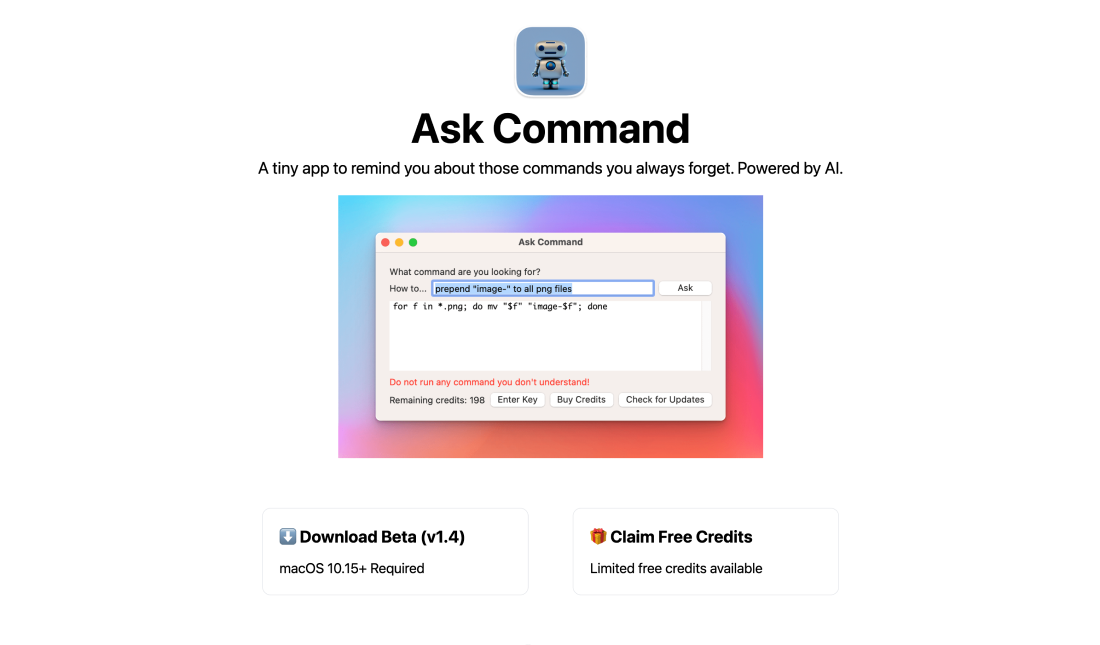
In today’s rapidly evolving digital landscape, efficiency and precision are paramount for developers, system administrators, and technical support personnel. With the increasing complexity of software environments, remembering and executing the right Unix commands efficiently is more challenging than ever before. Here enters Ask Command, an innovative artificial intelligence tool designed to bridge the gap between human query and technical execution. As a native macOS application, Ask Command provides solutions for those who find themselves reaching for the exact commands necessary to perform specific tasks. Utilizing OpenAI’s GPT-3 platform, the app is poised to revolutionize how Unix commands are accessed, applied, and remembered.
Ask Command stands out in the realm of productivity and developer tools by simplifying the process of command retrieval. Imagine the scenario of a busy system administrator or a frantic developer under pressure, all trying to locate a specific command in documentation or through online searches. Not only is this time-consuming, but it can also lead to the incorrect execution of unfamiliar commands. Ask Command eliminates these hurdles by allowing users to input queries and receive command suggestions tailored to their requests. The AI provides a seamless and efficient workflow, transforming how users interact with their terminals. Unlike traditional search methods, the app delivers a more interactive approach by understanding basic logic and conditions, which further expands its capabilities to tailor prompts, resulting in a more intuitive user experience.
What makes Ask Command particularly compelling is its foundation on a sophisticated AI model: OpenAI’s GPT-3. This integration not only enhances the precision and relevance of suggested commands but also learns user patterns over time, paving the way for even swifter command retrieval in future use cases. Moreover, the tool is designed as a sandboxed application, meaning it ensures user safety by not altering the system or executing commands autonomously. Every command suggestion is a recommendation, compelling users to verify and understand the implications before proceeding. This design supports a safe execution environment where users maintain complete control over what is run on their systems, which is essential for maintaining security and reliability within development environments.
While presently available only for macOS, the potential for Ask Command to expand to other operating systems like Windows and Linux offers promising future prospects. As usage grows, the tool’s developer, Tony Dinh, intends to explore other versions, which could broaden the tool’s applicability and reach. Through its commitment to user safety and high performance, Ask Command strategically places itself as an invaluable resource for those consistently working with Unix commands, ensuring that they never have to sift through extensive documentation or conduct time-consuming online searches again. As such, Ask Command is not merely an application; it is a pivotal companion in the daily toolkit of tech professionals.
Features
1. Ask Command employs OpenAI’s GPT-3 to generate tailored command suggestions for user queries.
2. The app is designed for seamless integrations with macOS, allowing commands to be copied directly into the terminal.
3. Ensures the app cannot alter system settings or autonomously execute commands, maintaining safety.
4. Capable of processing basic logic and conditions, enriching the quality and relevance of command suggestions.
5. Offers a basic tier, making it accessible to developers of all experience levels.
Advantage
1. Dramatically reduces the time spent searching for Unix commands, enabling developers to improve workflow effectively.
2. Sandboxed application means it does not compromise system integrity by running commands without user intervention.
3. The use of GPT-3 enhances the app’s capability to provide contextually relevant and accurate command suggestions.
4. Facilitates learning and memory of commands by providing contextual suggestions, which aids in professional growth.
Shortcoming
1. Currently only available on macOS, restricting access for users on other systems like Windows or Linux.
2. Users unfamiliar with AI tools might initially find the interface and functionality daunting.
3. Users must verify command accuracy independently, which could be seen as an additional step.
4. Despite its potential, it currently holds a modest popularity rating, indicating it may not yet be widely adopted.